
How to Search a Personal Media Library
Use reliable title clues, inspect active filters and learn from each result. A fictional query diary and a recorded Norva web check show the method and its limits.
In short: Start with one distinctive title word you trust, and inspect the active filters before adding more clues. Narrow useful results with a reliable detail; broaden an empty result by removing the least certain constraint. Check the candidate's identity before playing it. If a known title still cannot be found, separate a query problem from missing or incomplete source metadata.
You may remember a scene, a face or an approximate year more clearly than a title. The useful next step is to turn that memory into a small query you can evaluate, not type every clue into one long request. A catalogue can only search the fields and forms that its interface supports and its metadata supplies.
Create a clue inventory
Before typing, list clues under six headings:
| Clue | Example form | Certainty |
|---|---|---|
| Title | one unusual word or phrase | certain/probable/guess |
| Person | actor, director, creator, character | |
| Time | exact year, decade, before/after event | |
| Structure | film, series, season, episode, special | |
| Language | original or localised title, audio, subtitle | |
| Visual/story | artwork, location, premise |
Only some of these fields may be searchable in a particular interface. The inventory still helps you choose terms and inspect results.
Use the memory-to-query search ladder
Climb one rung at a time:
- Distinctive title fragment: enter the rarest correctly remembered word.
- Broader title form: remove articles, punctuation, or uncertain words.
- Alternate access point: try an original, translated, localised, or transliterated title.
- Person clue: search a verified cast or creator name form where supported.
- Context clue: add or filter by year, type, source, genre, or series only after seeing results.
- Catalogue diagnosis: clear filters, check source availability, and investigate metadata when expected content remains absent.
Start with the first applicable step supported by a clue you trust. Do not type title, year, actor, genre, and plot into one long request unless the search interface explicitly supports those fields and operators.
Know when to narrow or broaden
Narrow when results are numerous but relevant candidates are present. Add a high-confidence year, person, media type, or series context. Broaden when zero results appear or every result seems unrelated. Remove the least certain term first.
A filter can exclude a plausible candidate when the value you supplied is wrong or the record lacks the expected field. Treat an approximate year as a hypothesis, not a requirement. The worked example below shows why a narrower query is not automatically a better query.
Use the exact-versus-broad decision guide and partial-title technique for query construction. Do not assume quotation marks, wildcards, or Boolean operators work in Norva unless current interface guidance confirms them.
Inspect result evidence
Do not open the first familiar poster automatically. Compare:
- title and verified alternate title;
- release year or range;
- film, series, episode, or special type;
- creator or cast;
- synopsis premise;
- runtime and edition;
- source and version label;
- series and season context.
Use two or three independent clues. Artwork can be wrong, and two works can share a title.
Keep a query change log
For difficult searches, record:
| Attempt | Query/filter | One change | Result count | Best clue learned | Next step |
|---|---|---|---|---|---|
Changing one element per attempt reveals whether a title word, year, or filter removed the expected record. It also prevents repeating the same query with different punctuation and expecting a different result.
Worked example: a remembered word is right, but the year is wrong. This is an invented three-record catalogue, not a Norva search test. It contains Glass Harbour (2018), Harbour Lights (2020), and The Glass Road (2021). For this illustration only, assume the search matches every entered title word and an optional year filter requires that exact year.
The viewer trusts the word “glass” but only guesses 2020:
| Attempt | Query and year condition | One change | Matching records under these assumptions | What to do next |
|---|---|---|---|---|
| 1 | glass; year 2020 | Starting point | 0 | Question the uncertain year before concluding that the catalogue lacks the title |
| 2 | glass; no year condition | Remove the year only | 2: Glass Harbour and The Glass Road | Inspect the candidates and use another reliable clue |
| 3 | glass harbour; no year condition | Add the remembered word harbour | 1: Glass Harbour | Compare the description and other identity details |
The example does not establish Norva's matching algorithm, ranking, punctuation rules or supported search fields. Its lesson is the change log: removing one mistaken constraint restored candidates, then a reliable word narrowed them. A single match still needs an identity check; it is not proof that the viewer found the intended work.
Search episodes through hierarchy
When an episode title is forgotten, search the series first, then navigate the series-season-episode hierarchy. Use remembered guest person, plot word, approximate season, or neighbouring episode only where that metadata is present and searchable.
If the episode appears in global search but not inside the series, the problem may be a parent relationship rather than the query. Search should sometimes lead to a metadata audit.
Handle names, numbers, and languages carefully
Try a person’s surname, full verified name, and known credited form separately. For numbered titles, test the number as digits and words, and remove punctuation if results are empty. For multilingual works, try both original and familiar localised forms.
Search behaviour differs across systems. Use the current help for the interface in front of you rather than transferring another catalogue's search syntax to Norva. A translated title can be a useful clue without being a field the current source actually supplies.
Diagnose zero results systematically
First inspect which source and filters are active. Remove an uncertain condition, shorten the query, and try a verified alternate title where appropriate. Then search for a control item already visible in that source. Do not remove or reconnect a source simply because one query is empty. Separate “search did not match” from “record is absent or misidentified.”
Recorded Norva web example, 10 September 2026. The existing test-account walkthrough opened Movies → Filters with the neutral source nickname Blog walkthrough test and All Categories. Selecting Albanian under Audio language returned visible cards with Albanian badges. The capture below is the unchanged live English web panel from that walkthrough, not a mockup or a new test for this article. Labels may differ when the interface uses another language.
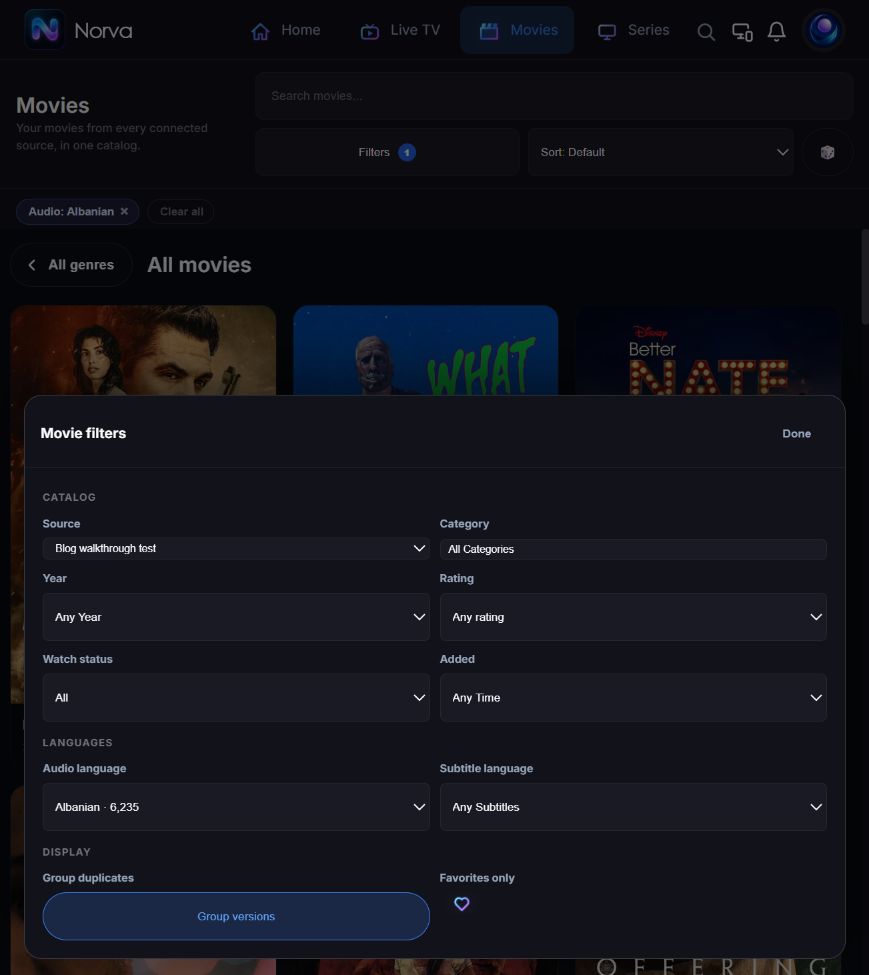
The recorded follow-up used Clear all to remove the audio condition, then searched for the previously visible title The Squad: Home Run. One grouped card displayed 12 versions; opening it showed a synopsis and version buttons, and Back returned to the result. Those are observations of that source and web session, not a promise about every search or twelve distinct films.
This evidence supports checking active filters and inspecting grouped results. It does not verify the spoken language of those files, successful playback, actor or plot search, cross-device behaviour, or native phone/TV controls. If your source or interface differs, record what it actually shows instead of treating this capture as a compatibility test.
Norva organises compatible authorised sources across supported devices, while searchable metadata and available records depend on those sources. Search does not provide a media catalogue by itself.
Common mistakes and limitations
- Entering every remembered clue at once.
- Treating an approximate year as exact.
- Assuming punctuation and case are always significant or always ignored.
- Selecting by poster alone.
- Leaving restrictive filters active.
- Repeating the same failed query without changing a hypothesis.
No search technique can retrieve metadata that is absent, incorrectly matched, or outside the connected authorised source.
Frequently asked questions
What is the best first query?
Use the rarest correctly remembered title word. If you remember no title text, start with the most distinctive searchable person or series clue supported by the interface.
Should I add the year immediately?
Add it when results need disambiguation and the year is reliable. An approximate or territory-specific release year can remove the correct record.
When is the problem metadata rather than search?
Suspect metadata when a known control search works, filters are clear, the source is available, and the expected record appears under a wrong title, parent, identifier, or field.